Android 17 is getting a new Continue activity menu that lets our phones pass tasks, apps, notifications and files to our other devices. I already have it running on my Pixel 11 Pro XL, and it's arriving just before Googlebook pre-orders open, giving the best Android phones a real answer to the Handoff trick iPhone 18 Pro Max owners already enjoy.
Google Play Services quietly adds a Continue activity hub
The new menu was spotted by AssembleDebug, who has been digging cross-device features out of Google Play Services code for years, and it's detailed in a new report. It showed up on a Pixel 9 running the stable version of Android 17, sitting inside the existing Cross-device services menu right next to Call casting and Internet sharing.
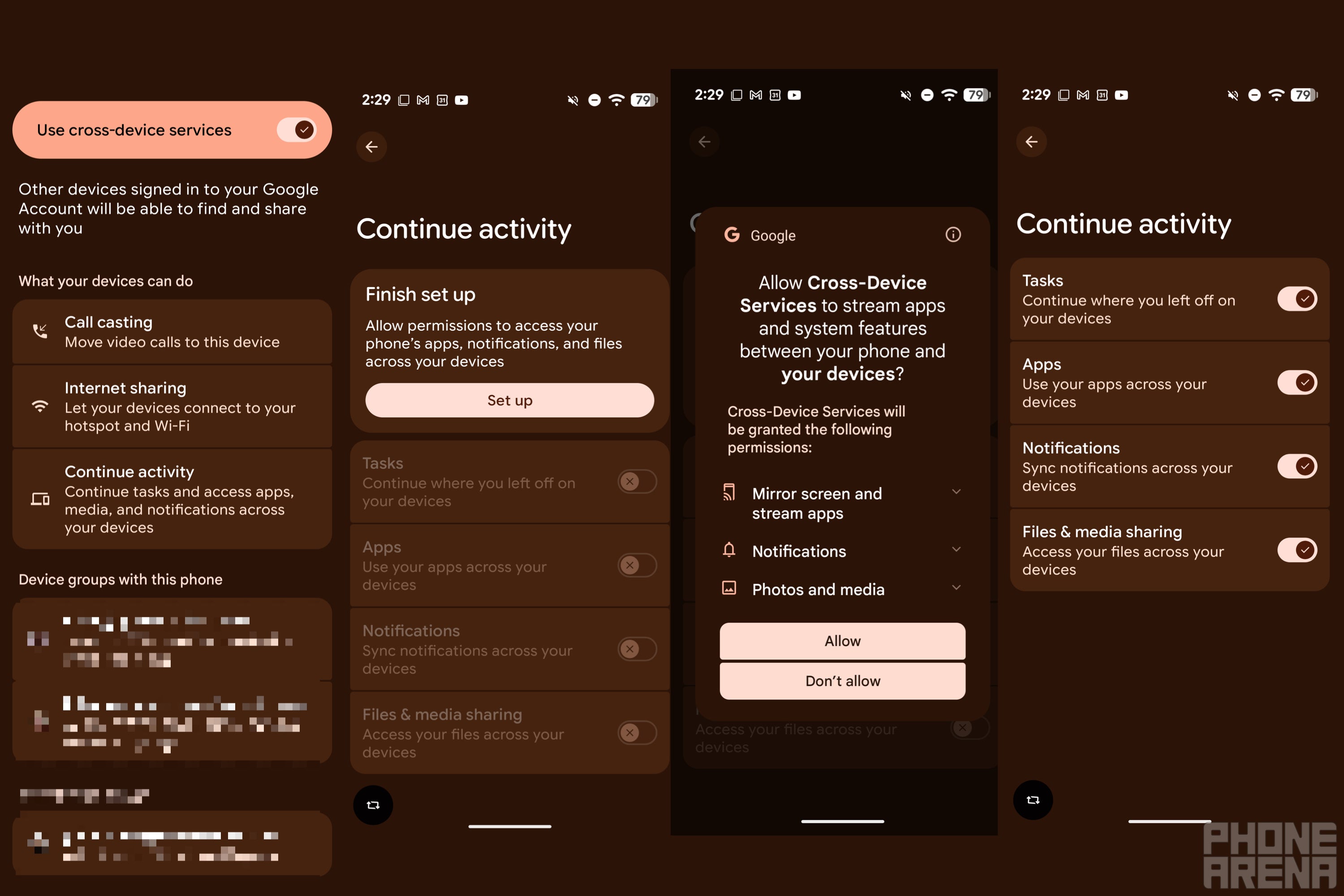
Upon updating to the September Google Play system update, I found the same menu on my Pixel 11 Pro XL, and opening it reveals four toggles that can each be switched on separately: Tasks, Apps, Notifications and Files & media sharing.
The new Continue activity menu and its permission sheet on the Pixel 11 Pro XL. | Image by PhoneArena
Turning them on brings up a permission sheet asking to let Cross-Device Services mirror your screen and stream apps, handle notifications and access your photos and media. Since this is coming through Play Services rather than a system update, it appears to be a gradual server-side rollout, so not everyone on Android 17 will see it right away.
Recommended For You
Which Continue activity toggle are you switching on first?
3 Votes
Why Continue activity matters for Googlebooks and iPhone rivals
The Tasks toggle is likely the new home for Continue On, which Google introduced with Android 17 to let you jump back into an app on a tablet with a single tap from its taskbar. We saw strings for this whole system months ago, and the timing now makes sense, since Google confirmed on Android's social accounts that Googlebook pre-orders open on September 21.
Of course, Apple has offered this for years through Handoff, which lets you start something on one Apple device and continue it on another nearby one, as long as both use the same Apple Account. It's on by default and already works in apps like Safari, Mail and Notes, along with many third-party apps, so iPhone 18 Pro Max owners won't feel much pressure from this yet.
Samsung's own Continue apps feature is far more limited, since it only covers Samsung Notes and Samsung Internet between Galaxy devices signed in to the same Samsung account. However, Google's cross-device services already reached select Galaxy phones, so Galaxy owners could likely end up with a broader handoff tool than Samsung's own.
What Continue activity means for Android 17 users right now
If you're on Android 17 and see the menu, you get to decide exactly what crosses over, since every toggle works on its own. That matters, because the permission list is fairly broad, and someone who only wants notification sync doesn't have to share their photos too.
It should be noted that Tasks depends on apps supporting Continue On, so how useful it feels will likely come down to which apps adopt it by the time Googlebooks ship.
I'm hoping Google's handoff doesn't stop at its own apps
I switched on all four toggles on my Pixel 11 Pro XL as soon as I found them, which only took a Set up prompt and one permission sheet.
I'm guessing Google will show off its own apps first, but I'd personally love to see third-party developers jump on Continue On early, so picking up where I left off on a Googlebook doesn't feel limited to a handful of apps.
Mint Mobile is now allowing you to get whichever plan you like for either three, six, or 12 months for just $15/mo. If you go for the six-month unlimited service, for instance, you'll now have to pay just $90 upfront instead of $210.
Johanna Romero is a Senior News Writer at PhoneArena, covering mobile technology news across Android, iOS, wearables, and the Google ecosystem she knows best. Drawing on 15 years in IT and tech support from 2007 to 2022, she brings a user-friendly eye for the practical features and lesser-known tricks readers care about. Google named her an official #TeamPixel member in 2022, and she also reviews the latest devices on her YouTube channel, JoJo the Techie.
A discussion is a place, where people can voice their opinion, no matter if it
is positive, neutral or negative. However, when posting, one must stay true to the topic, and not just share some
random thoughts, which are not directly related to the matter.
Things that are NOT allowed:
Off-topic talk - you must stick to the subject of discussion
Offensive, hate speech - if you want to say something, say it politely
Spam/Advertisements - these posts are deleted
Multiple accounts - one person can have only one account
Impersonations and offensive nicknames - these accounts get banned
To help keep our community safe and free from spam, we apply temporary limits to newly created accounts:
New accounts created within the last 24 hours may experience restrictions on how frequently they can
post or comment.
These limits are in place as a precaution and will automatically lift.
Moderation is done by humans. We try to be as objective as possible and moderate with zero bias. If you think a
post should be moderated - please, report it.
Have a question about the rules or why you have been moderated/limited/banned? Please,
contact us.











Things that are NOT allowed:
To help keep our community safe and free from spam, we apply temporary limits to newly created accounts: